EMMA
A smart walking stick designed to assist visually impaired users with navigation and safety. The project focused on integrating sensors, programming, and user-centered design to enhance mobility.
Project type: Group
Tools used
Python
Beaglebone Black
Smart Wellbeing System
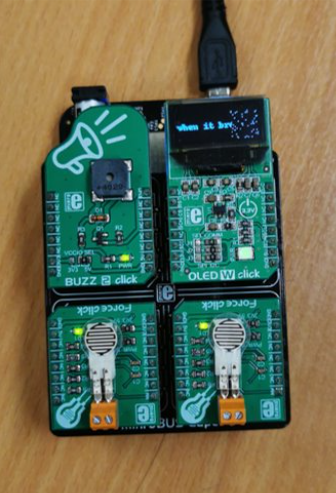
With the press of a button, the device would display a joke on the OLED to entertain the user. The jokes would be chosen from my jokes bank, so no same joke will be displayed twice.
Upon the press of the second button, a friendly tune will be played to entertain the user.
Smart Sedentary Alarm
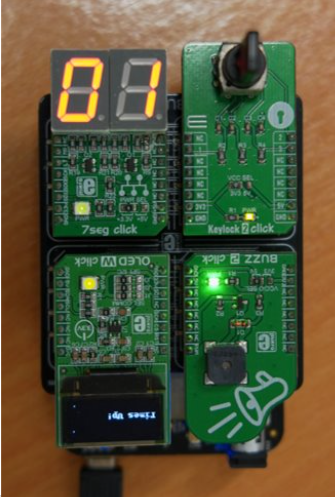
When the keylock is turned, a timer will start. When it rings, the buzzer will beep to indicate that they should take a break. They can turn the keylock again to restart the timer.
The device is installed on the walking stick to warn users when they should stop to take a break
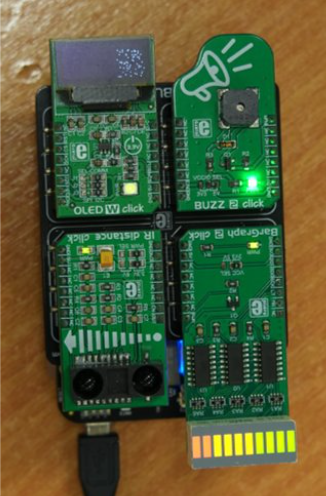
Smart distance tracker
The distance tracker is designed to be able to sense oncoming dangers via the use of a proximity sensor.
As something gets closer to the distance tracker, it will display the danger and proximity in its respective color and number of bars lit up. The buzzer will also begin buzzing to indicate danger if the hazard gets too close.
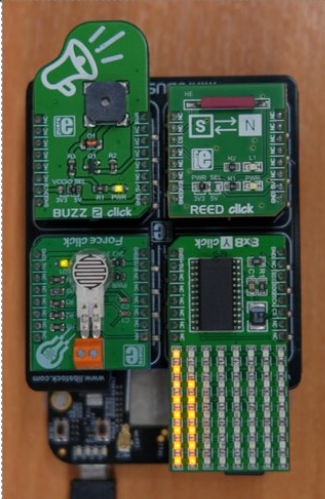
Smart Pillbox System
The Smart Pill Box is intended to tell the user when they would have to take their medication.The REED sensor is intended to detect when the lid of the pill box is opened, so it can indicate that the user’s medication has been taken.
An 8x8 display is also used to indicate the duration left until the next set of medication needed to be taken.
The Backbone
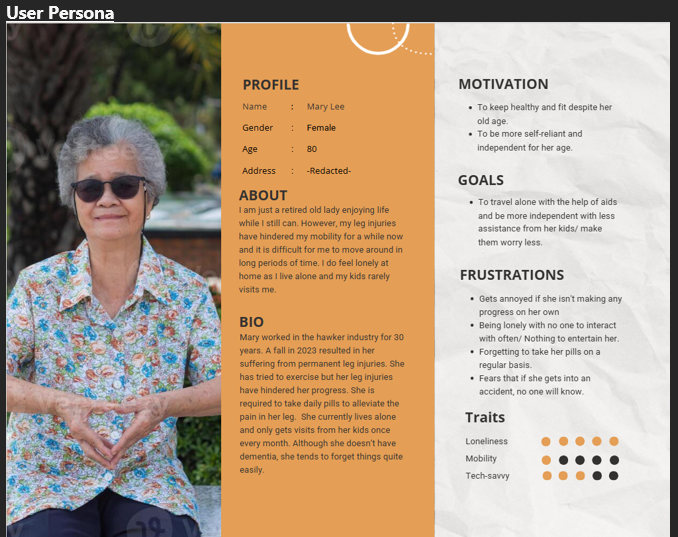
Beyond the front-end design, EMMA relies on clear, structured logic. The following snippets show how I handled data collation, competitor analysis, and translation of data.
Our Objectives
- Enhance Safety
Detect potential hazards and provide real-time alerts to prevent accidents.
- Promote Healthy Activity
Encourage walking and other physical activities by making moving around less arduous and safer for them.
- Look Out For Them
Allow for caretakers and others to check in on their well-being from a simple website.
- Support Independent Living
Empower elderly individuals to be more mobile and independent and live without the need for constant supervision.
Handling the input and displaying the output
For the PCB board to function properly, it has to understand the data of the input and translate it into an output that the elderly is able to understand. Let's take the distance tracker as an example.
BarGraph2Display(G_Spi1, G_NumberOfBar)
DigitalValue = ADC.read("P9_37")
if DigitalValue != 0:
AnalogVoltage = (DigitalValue * 1.8) * (2200 / 1200)
DistanceCM = 29.988 * pow(AnalogVoltage, -1.173)
print("Distance(cm): %f" % DistanceCM)
try:
sio.emit('BBBW2Event', {'data': DistanceCM})
print("Data sent!")
except:
print('Unable to transmit data.')
pass
if DistanceCM < 40:
G_NumberOfBar = 10
elif DistanceCM < 50:
G_NumberOfBar = 8
elif DistanceCM < 60:
G_NumberOfBar = 6
elif DistanceCM < 70:
G_NumberOfBar = 4
elif DistanceCM < 80:
G_NumberOfBar = 2
else:
G_NumberOfBar = 0
Competitor Analysis
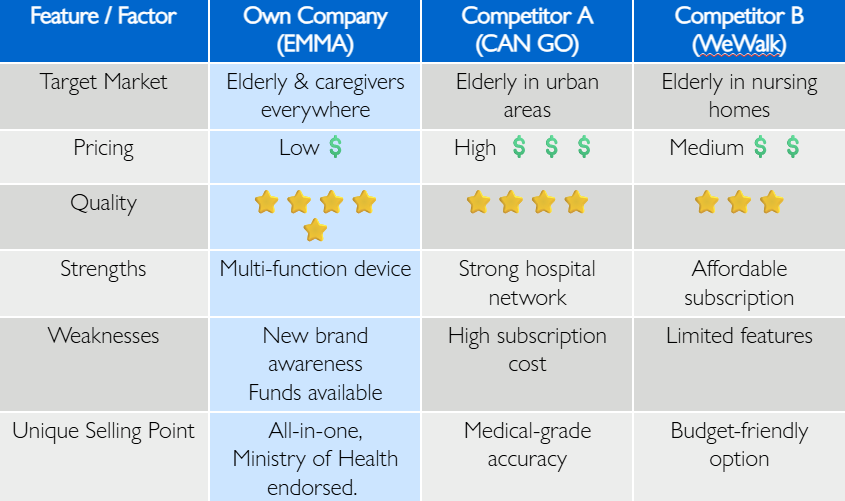
For our product to be successful, we got to have an edge over our competitors in the market. We decided to make EMMA a low cost but multi-functional walking stick, so that our consumers will be able to afford a good quality aid device.
Through this short exercise, I learnt elements of product design, cost optimization, and strategic decision-making and making informed decisions so as to have an edge over our competitors. This is incredibly important as we always want our product to be the best in the market.
Collate all data together
To allow caregivers to have a full view of all the sensors working together, I had to find a way to display all data from all the sensors at the same time, so caregivers are able to see if the elderly is in any type of distress.
@sio.event
def connect():
print('Connection established.')
@sio.event
def disconnect():
print('Disconnected from server.')
while True:
try:
sio.connect('http://192.168.72.132:5000')
break
except:
print("Try to connect to the server.")
pass
By connecting all sensors to a common IP address, all sensors can be displayed together.
Final Thoughts
Lessons Learned and Insights Gained: Challenges, Skills, and Growth from This Project
Lessons learnt
-
- Ahh, a group project.. I have a love-hate relationship with it. Consulting with team members is something that I always love about it, but the constant thought of disappointing them is something that's always on my mind.
-
- EMMA was a creative idea that came about from one of my group mates. All of us agreed that it was a great idea, something not commonly found in our society, but the benefits of it is huge.
-
- The planning was tough, from the gantt chart, because I had to break down all the milestones clearly and estimate realistic time for each task. It taught me the importance of time management and forward planning in a project.
-
- Testing and debugging took longer than expected, but it showed me the value of iterative improvement and checking work step by step rather than rushing.
-
This project was long and tough, but I am glad to be able to complete it with my teammates.
Skills demonstrated
- Hardware Integration: : connected sensors, LEDs, and buzzers to a microcontroller
- Programming: Processed sensor data and controlled outputs via code.
- Design Thinking: Planned where to place all the sensors for optimal efficency and usefulness.
Technical Skills
-
- Teamwork: Collaborated effectively with team members to divide responsibilities, coordinate tasks, and integrate hardware and software components.
- Problem Solving in collaboration: Worked with teammates to troubleshoot sensor and programming issues, ensuring the prototype functioned as intended.
- Project Management: Persisted through challenges in coding, sensor calibration, and system testing until the project met design goals.